Updated
About Klondike Solitaire
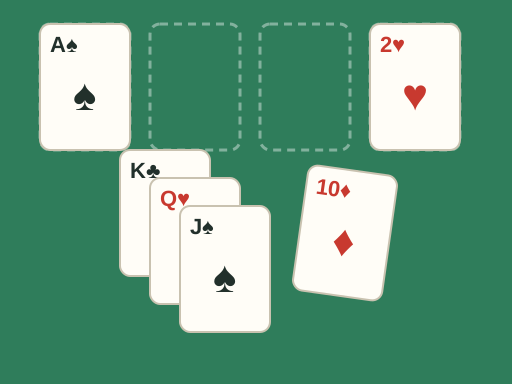
Klondike is the best-known solitaire card game, the one most people simply call solitaire. It is played with a standard 52-card deck. Twenty-eight cards are dealt into seven columns, called the tableau, with only the top card of each column face up. The remaining cards form the stock. The goal is to move every card onto four foundations, one for each suit, building up from ace to king.
This TapGameHub edition is based on an open-source JavaScript version, with an original card design on a green table. It uses the classic draw-three rule and allows unlimited passes through the stock. When you clear the last card, the deck celebrates with the famous bouncing-card finish.
How to play
- Look for aces in the tableau. Any ace can go straight to an empty foundation.
- Build down on the tableau in alternating colors. A red 9 can go on a black 10, and a black 8 can then go on that red 9.
- You can move a single face-up card or a whole face-up stack, as long as the top card of the stack fits where you put it.
- When you move the last face-up card off a column, the face-down card under it turns over.
- Only a king, or a stack starting with a king, can go into an empty column.
- Click the stock to turn over three cards. The top card of the waste pile can be played to the tableau or a foundation.
- Build each foundation up in one suit from ace to king. The game is won when all four foundations are complete.
Controls
| Action | Mouse or trackpad |
|---|---|
| Turn over cards from the stock | Click the stock |
| Recycle the waste pile | Click the empty stock space |
| Move a card to the first legal spot | Click the card |
| Move a card or stack to a chosen spot | Drag it and drop it on a highlighted pile |
| Deal a new game | New game button |
A single click moves the card to the first legal place the game finds, checking the foundations first. To choose a specific column instead, drag the card. While you drag, every pile that accepts the card is highlighted.
Strategy tips
- Reveal face-down cards first. A move that turns over a hidden card is almost always better than one that does not. Work on the longest columns early, because they hide the most cards.
- Do not rush cards to the foundations. Low cards are safe to send up, but a 5 or 6 may still be needed in the tableau to hold a card of the opposite color.
- Empty a column only when a king can use it. An empty column that only a king can fill is wasted if no king is available.
- Choose your kings carefully. When you can move either a red or a black king into an empty column, think about which queens and jacks are waiting to be played.
- Remember the order of the stock. In draw three, the cards come out in groups. Playing one card from the waste pile changes which cards you will see on the next pass.
- Play from the tableau before the stock. Moves on the tableau open up new options. Draw from the stock when there is nothing useful left to do there.
Frequently asked questions
Is this draw one or draw three solitaire?
This is draw three. Each click on the stock turns over up to three cards, and only the top card of the waste pile can be played. Draw three is the classic rule set and takes more planning than draw one.
How many times can I go through the deck?
As many times as you like. When the stock is empty, click its empty space to turn the waste pile back over and start drawing again. There is no limit on passes and no penalty for redealing.
Can every game of Klondike be won?
No. Each game is a random shuffle, and some deals cannot be solved however well you play. That is part of the challenge. If a deal feels hopeless, start a new game.
Is there an undo button?
No. This edition has no undo, so think before each move, especially before you send a card to a foundation or move a card off a column that is hiding face-down cards.
Is my game saved if I close the page?
No. This edition does not save an unfinished deal or keep statistics. Closing or reloading the page deals a fresh game.
Can I play on a phone or tablet?
This edition is designed for a mouse or trackpad, and dragging cards does not work on touchscreens. Please play it on a computer. For card games that work well on phones, try FreeCell.
Game not loading or controls not responding? See help with loading, controls and saves.