Updated
About Air Hockey
Air hockey is a fast table game for two players. Each player holds a round mallet and tries to hit a light puck into the opponent’s goal while defending their own. On a real table, a cushion of air lets the puck glide almost without friction, so rallies are quick and shots bounce off the side rails at sharp angles.
This TapGameHub version is an original game designed for playing with a friend on one device. On phones and tablets, each player uses their own half of the touch screen. On a computer, both players share the keyboard. You can also play against the computer when you are on your own.
How to play
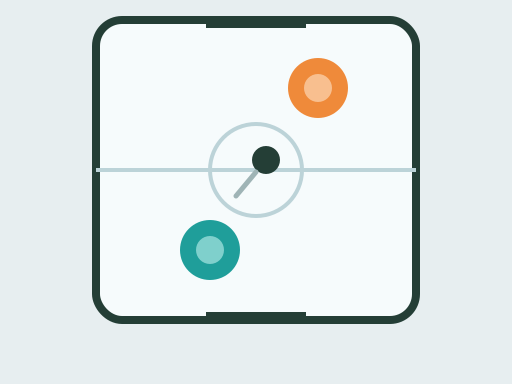
- Teal defends the goal at the bottom of the table and Orange defends the goal at the top.
- Move your mallet in your own half to strike the puck. The faster your mallet is moving when it hits the puck, the harder the shot.
- Bounce shots off the side walls to get around your opponent’s mallet.
- Score by sending the puck through the opening at the other end. A goal only counts once the whole puck has crossed the line.
- After each goal, the player who conceded gets the puck on their side.
- The first player to reach seven goals wins the match.
The puck gradually slows down when nobody hits it, so a stalled puck in your half is your chance to line up a shot.
Controls
| Action | Teal (bottom) | Orange (top) |
|---|---|---|
| Move the mallet with touch | Touch and drag in the bottom half | Touch and drag in the top half |
| Move the mallet with the mouse | Move the mouse over the table | Not available |
| Move the mallet with keys | Arrow keys | W, A, S and D |
| Pause or resume | P key or Pause button | P key or Pause button |
| Choose an opponent | 2 Players or vs Computer | 2 Players or vs Computer |
| Start a new match | New match button | New match button |
In vs Computer mode, you play Teal and the computer controls Orange. Click inside the game before you use the keyboard.
Strategy tips
- Stay between the puck and your goal. When you are not attacking, keep your mallet in front of the goal opening, a short distance out.
- Hit through the puck. A mallet that is already moving when it reaches the puck sends it much faster than one that is standing still.
- Use bank shots. A shot off a side wall arrives at an angle that is harder to block than a straight shot.
- Do not chase into your opponent’s half. Your mallet cannot cross the center line, so reaching for a puck you cannot hit leaves your goal open.
- Control slow pucks. When the puck stops in your half, take a moment to set up a shot instead of hitting it straight back.
- Against the computer, go wide. It reacts to where the puck is, so sharp angles and quick rebounds give it the most trouble.
Frequently asked questions
How do two players share one screen?
The table is split in half. On a phone or tablet, each player touches their own half to control their mallet, and multi-touch lets both play at once. On a computer, Teal uses the arrow keys or the mouse and Orange uses W, A, S and D.
How many goals win a match?
The first player to score seven goals wins the match. The final score appears at the end, and Rematch starts a new match straight away.
Who gets the puck after a goal?
The player who conceded. After each goal the puck is placed on the side of the player who was just scored on, giving them the chance to strike first. The very first serve of a match goes to a random side.
Can my mallet cross the center line?
No. Each mallet stays in its own half of the table, just like on a real air hockey table. Only the puck can travel the full length.
How good is the computer?
The computer defends its goal when the puck is coming toward it and attacks when the puck slows down in its half. It moves at a limited speed, so fast shots at an angle and quick rebounds off the side walls are the best way to beat it.
Is the match saved?
Your choice of 2 Players or vs Computer is saved in this browser. The score of a match is not saved, and the game pauses on its own if you switch to another tab or app.
Game not loading or controls not responding? See help with loading, controls and saves.